Free Reseller Inventory & Profit Tracker for Excel
Know what you paid, what you made and what is sitting unsold. One spreadsheet for everything you resell on Vinted, eBay, Depop, Etsy or at a market. Download it, no sign-up. Opens in Excel and Google Sheets.
Download (.xlsx)
Not sure what to pay before you buy?
Check an item free, no account. The Resale IQ checker gives a buy-below price and a BUY, WATCH or SKIP call from typical Vinted asking prices.
Already selling? The free Seller Ledger reads your Vinted statement in your browser and shows where you stand against the 30-sale and EUR 2,000 reporting lines.
Six tabs
- Inventory: one row per item with cost, shipping, platform, listed and sold dates and sale price. Profit, ROI and days to sell fill in by themselves, and a Duplicate? column flags a row whose item name, buy date and buy price repeat another row. Room for 1,000 items, any currency.
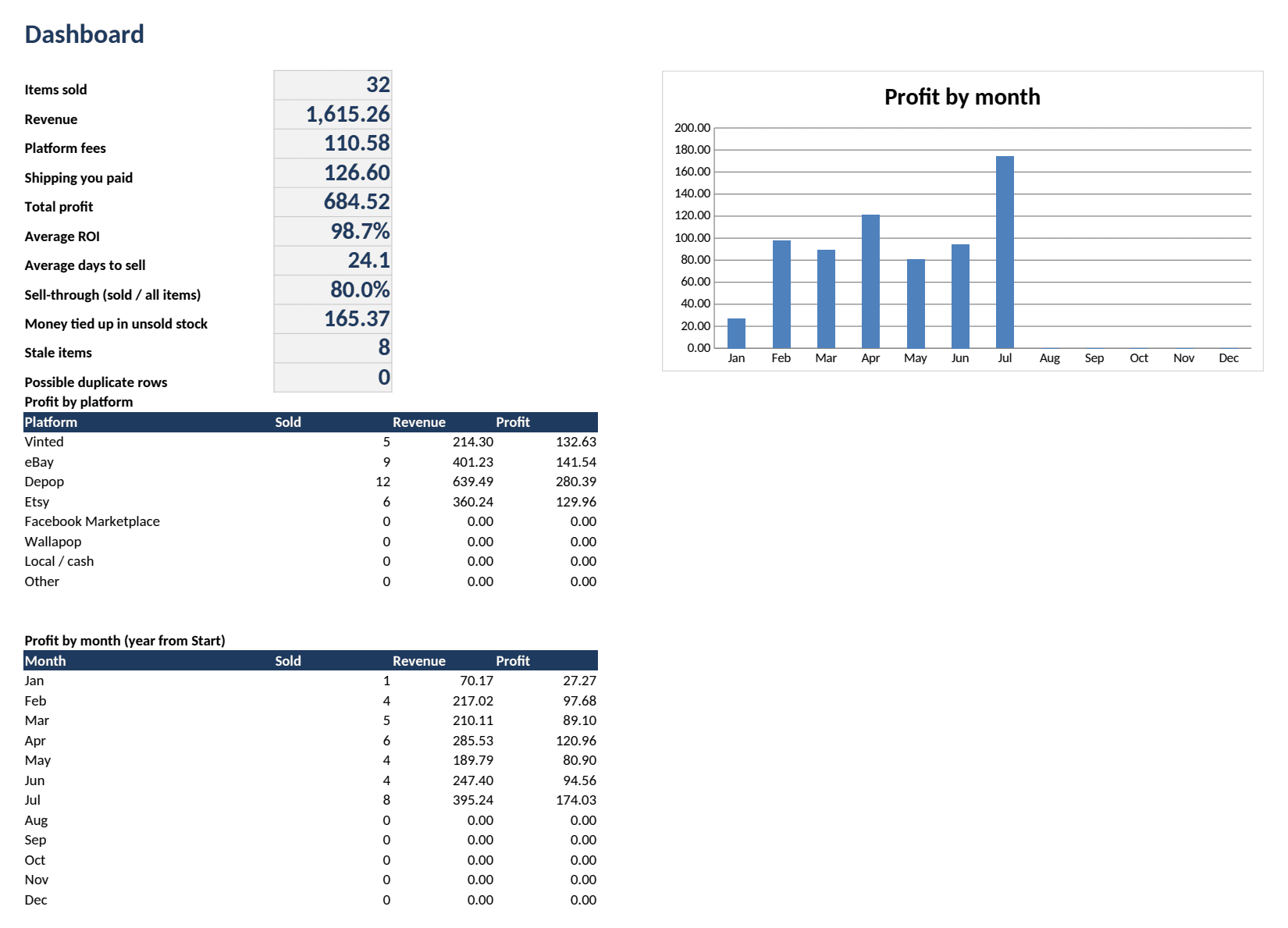
- Dashboard: revenue, fees, shipping, total profit, average ROI, average days to sell, sell-through, money tied up in unsold stock, stale items, possible duplicate rows, profit by platform and by month, with a chart.
- Buy-below: type the resale price and the platform and see the most you can pay and still reach your profit goal.
- Reconcile: for each platform and period, the payout you received against sale prices minus platform fees from Inventory, with the difference and a one-line result. The example file shows one match and one shortfall.
- Start: pick the year, after how many days stock counts as stale, and your profit goal.
- Lists: platform fees. The percentages in the file are examples. Edit the yellow cells to match your own seller statement and every sale follows.
How to use it
- Download the empty file and open it in Excel. For Google Sheets, upload it to Google Drive and open it with Sheets.
- On the Start tab, set the year, the stale-stock days and your profit goal.
- On the Lists tab, check the fee percentages against your own statements for each platform.
- Add each item you buy on the Inventory tab. When it sells, fill in the sale date and price. The Dashboard updates by itself.
Check the fees yourself
The fee percentages in the file are examples, not a current fee table. Platforms change their fees, and what you pay depends on category, country and seller level. Read your own seller statement and edit the yellow cells. For the fee rules we have checked, see our Vinted fees by country.
How it's made
Designed by Tabellaro. The formulas and texts were written with AI tools. We then recalculated the EXAMPLE file in LibreOffice and compared the results with an independent calculation. We have not tested it in Excel or Google Sheets. The screenshot on this page is an unedited image of the real EXAMPLE file.
Next: is the item worth buying?
The Buy-below tab works from the resale price you type in. For a price check on a Vinted listing before you buy, use the free check on Resale IQ.
Free price check →Free Google Sheets profit tracker →All templates →
Questions
Is it really free?
Yes. Download it, change it, keep it. There is a link to Resale IQ's free price check on the Start tab and nothing else.
Do I need an account or an email address?
No. The two files download straight from this page.
Does it work in Google Sheets?
It is meant to: upload the .xlsx to Google Drive and open it with Google Sheets. We built and recalculated it in LibreOffice and have not tested it in Excel or Google Sheets, so tell us at support@resaleiq.dev if anything looks wrong.
Which marketplaces does it cover?
Vinted, eBay, Depop, Etsy, Facebook Marketplace, Wallapop, local or cash sales and Other. Every platform's fee percentages are yours to edit on the Lists tab.
Does it work in my currency?
Yes. It adds up the numbers you type, so keep one currency per file or convert before you log.
What is it for?
Tracking your sales, costs and fees. Check fee rates with each platform and ask a tax adviser about your own situation.